How to connect your Uteach website to Make
Make lets you connect Uteach with other tools and automate actions between them. You can use it to send data from Uteach to CRMs, spreadsheets, email platforms, Slack, and many other apps.
With Make, automations are built as scenarios, and one of the most common ways to connect an external platform is through a webhook, which receives data instantly from another system. Make’s custom webhooks generate a unique URL that can be added to another platform to trigger a workflow.
What you can automate
After connecting Make to Uteach, you can build workflows such as:
- sending new student data to Google Sheets
- creating CRM contacts after registration or purchase
- sending Slack or email notifications for new enrollments
- syncing webinar or course activity with other systems
- triggering follow-up flows after form submissions
Before you start
Before setting up the integration, make sure you have:
- an active Uteach account with access to the dashboard
- a Make account
- permission to access the relevant Uteach settings
- a clear idea of what action should trigger the automation
How the integration works
In most cases, the connection works like this: Uteach sends data from a selected event, and Make receives that data through a webhook or another supported connection. In Make, that data can then be processed and forwarded to other apps.
Make supports custom webhooks, which create a unique URL for incoming data, and can also optionally validate payload structure, support API key protection, and process webhook calls instantly.
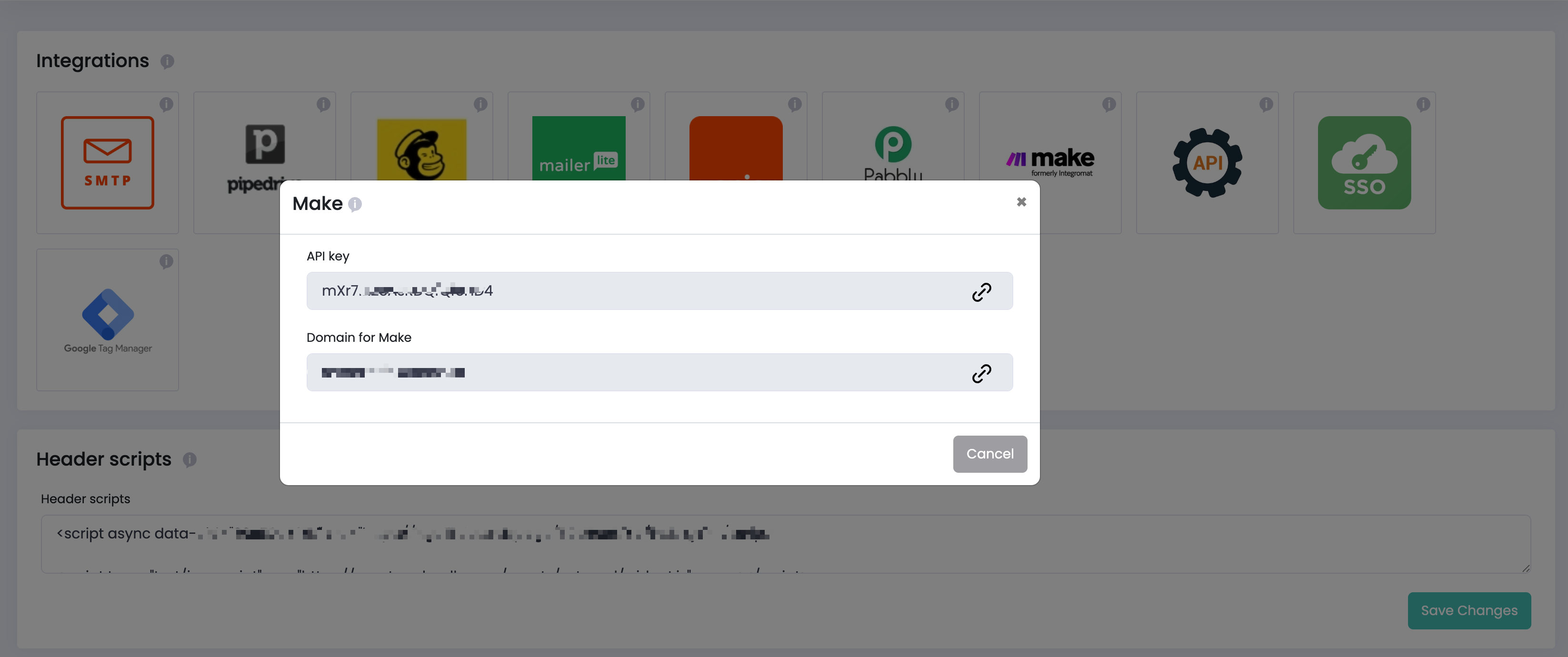
Connecting Make with Uteach is simple — you only need your API key and domain.
- Go to your Uteach Dashboard → Integrations → Make
- Copy API Key from Uteach and your academy domain (e.g.
yourdomain.uteach.io) into Domain for Make - Go to Make and create a new scenario, then Click +
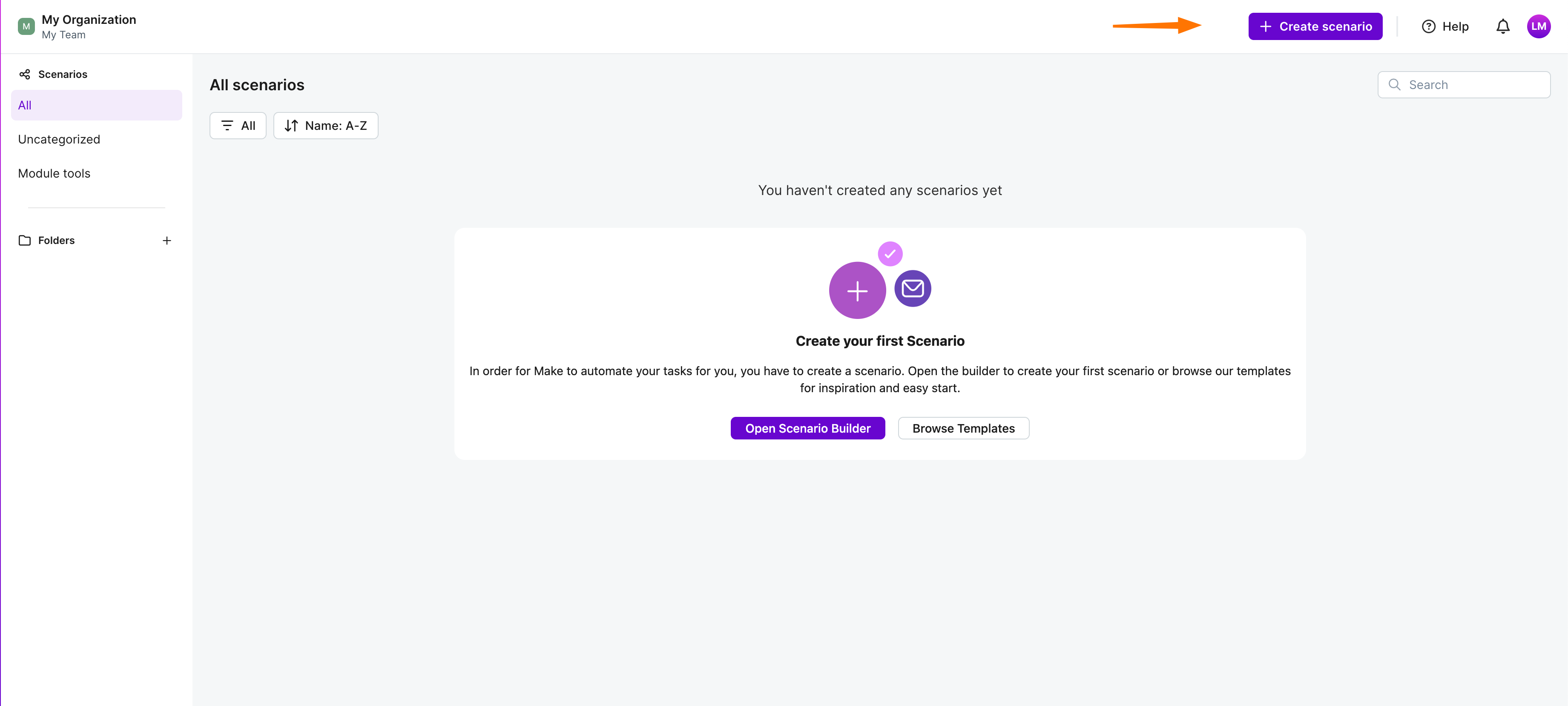
- Search for Uteach
- Select any Uteach module (trigger or action)
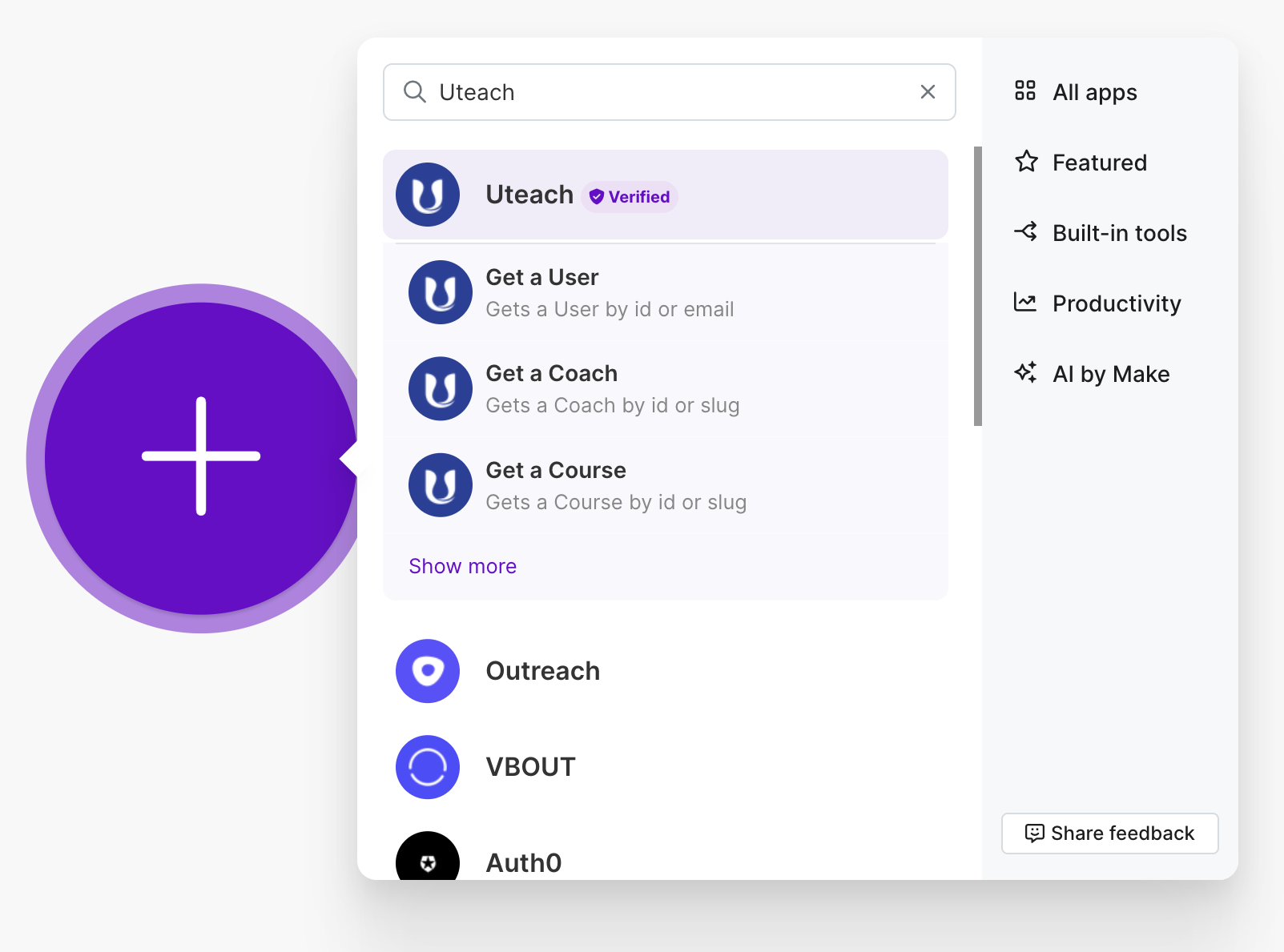
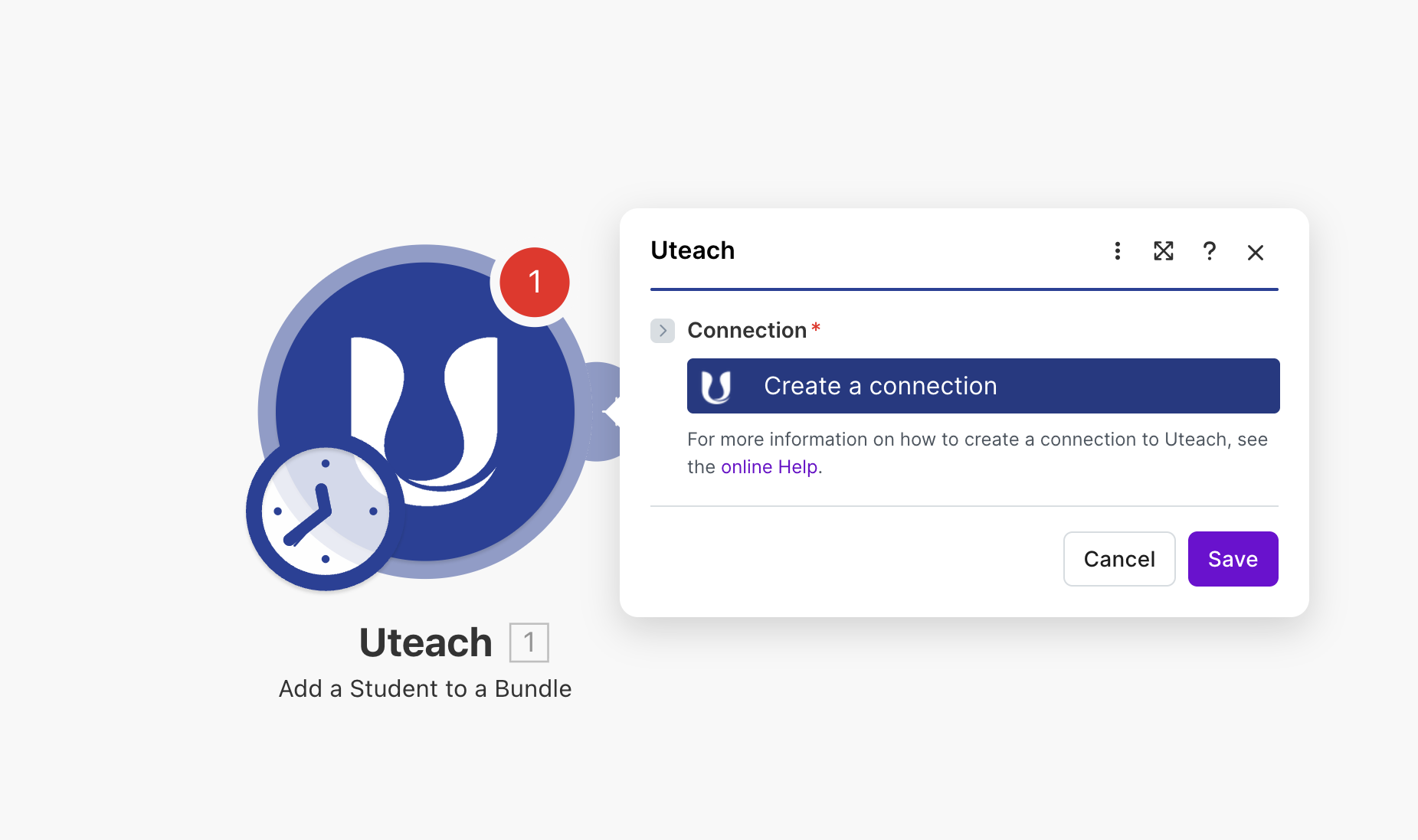
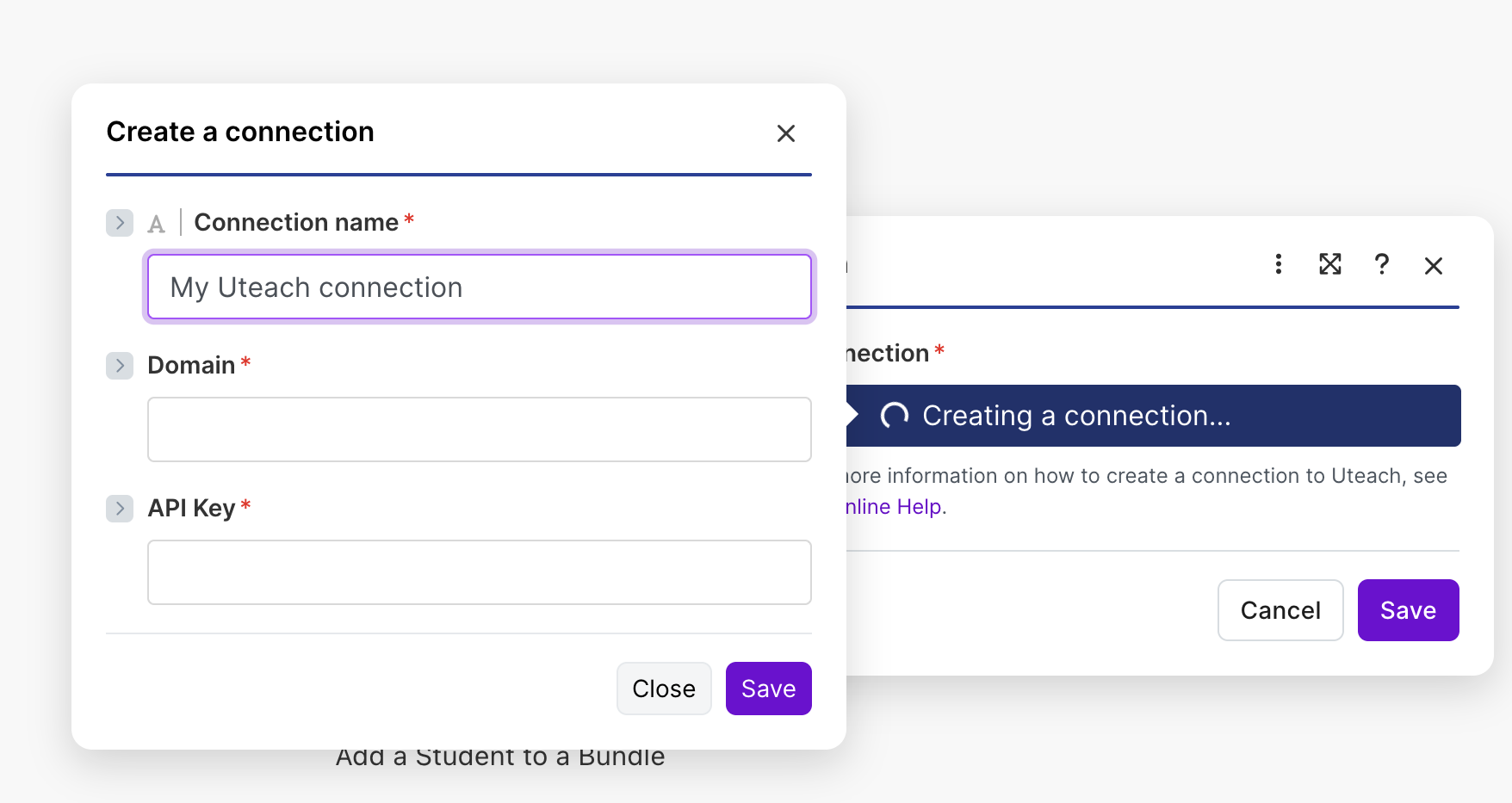
- Click Add connection
- You will see 2 required fields:
- API Key
- Domain
- You will see 2 required fields:
4. Paste Uteach data into Make
5. Save the integration
Done ✅
Your Uteach account is now connected to Make, and you can start building automations (scenarios) using your Uteach data.
Author![{"id":2,"user_id":25,"slug":"lusine-mkhitaryan","full_name":"Lusine Mkhitaryan","position":"Customer Support Specialist","tagline":"Customer Support Specialist","image":"uteach\/authors\/LxVlxPVHH6bKnNI51DR8-1743576946\/t02qfsy3cq2-u02u10sqk1q-727b0c81e36f-512.jpg","short_text":"I\u2019m a motivated Customer Support Specialist who thrives on making every customer experience smoother, more efficient, and more positive. \r\n\r\nI am dedicated to addressing customer needs with empathy, professionalism, and efficiency, always aiming to provide clear and effective solutions.\r\n\r\nMy approach emphasizes understanding the unique challenges customers face and finding creative ways to resolve them. I\u2019m passionate about streamlining support processes, optimizing workflows, and using innovative tools to deliver the best possible outcomes for customers.","education":"<ul><li>Bachelor's in English Language and Literature, Brusov State University\u00a0<\/li><li>Certified in Customer Service: Managing Customer Expectations<\/li><li>Certified in Innovative Customer Service Techniques<\/li><li>Certified in Working with Upset Customers<\/li><\/ul>","experience":"<ul><li>Customer Support Specialist at Uteach\u00a0<\/li><li>Digital Marketing Specialist at Munich Ventures\u00a0<\/li><li>Learning Platform Coordinator at WooChess\u00a0<\/li><li>E-commerce Administrator at Hafo.am\u00a0<\/li><li>Content Writer at Armenia Discovery<\/li><\/ul>","social_insta":null,"social_fb":null,"social_twitter":null,"social_linkedin":"https:\/\/www.linkedin.com\/in\/lusine-mkhitaryan","meta_title":"Lusine Mkhitaryan | Uteach Authors","meta_keywords":null,"meta_description":null,"json_ld":"{\r\n \"@context\": \"https:\/\/schema.org\",\r\n \"@type\": \"Person\",\r\n \"name\": \"Lusine Mkhitaryan\",\r\n \"jobTitle\": \"Customer Support Specialist\",\r\n \"worksFor\": {\r\n \"@type\": \"Organization\",\r\n \"name\": \"Uteach\",\r\n \"url\": \"https:\/\/uteach.io\"\r\n },\r\n \"alumniOf\": {\r\n \"@type\": \"EducationalOrganization\",\r\n \"name\": \"Brusov State University\"\r\n },\r\n \"hasCredential\": [\r\n {\r\n \"@type\": \"EducationalOccupationalCredential\",\r\n \"name\": \"Customer Service: Managing Customer Expectations\"\r\n },\r\n {\r\n \"@type\": \"EducationalOccupationalCredential\",\r\n \"name\": \"Innovative Customer Service Techniques\"\r\n },\r\n {\r\n \"@type\": \"EducationalOccupationalCredential\",\r\n \"name\": \"Working with Upset Customers\"\r\n }\r\n ],\r\n \"knowsAbout\": [\r\n \"Customer Support\",\r\n \"Workflow Optimization\",\r\n \"Support Automation\",\r\n \"Empathy in Service\",\r\n \"Conflict Resolution\"\r\n ],\r\n \"sameAs\": [\r\n \"https:\/\/www.linkedin.com\/in\/lusine-mkhitaryan\/\"\r\n ]\r\n}","created_at":"2025-01-24T16:10:14.000000Z","updated_at":"2025-04-24T22:38:45.000000Z"}](https://d35v9chtr4gec.cloudfront.net/uteach/authors/LxVlxPVHH6bKnNI51DR8-1743576946/t02qfsy3cq2-u02u10sqk1q-727b0c81e36f-512.jpg)
![{"id":4,"user_id":5487,"slug":"sona-hoveyan","full_name":"Sona Hoveyan","position":"Edu-Centric Content Writer","tagline":"Edu-Centric Content Writer","image":"uteach\/authors\/FHMfpw6mwKolEA5nrK7s-1743576925\/1689750055996.jpg","short_text":"I\u2019m Sona, a curious writer who never posted about \u201c Why AI cannot come for your writing job.\u201d After one year of teaching, I realized that the idea of informal education appealed to me more. \r\n\r\nNow, I specialize in helping coaches, educators, and course creators grow their businesses through actionable content. From blog posts and interviews with creators to guides and engaging newsletters, I focus on delivering various perspectives and experiences in a single piece of writing. \r\n\r\nEssentially, I either write content that keeps you on your toes or touch my toes and stretch. Because flexibility is a life skill, whether on the yoga mat or in education.","education":"<ul><li>Bachelor\u2019s in Teaching English as a Second\/Foreign Language Language Instructor, GSU<\/li><li>Bachelor\u2019s in Modern Languages, UCAM Universidad Cat\u00f3lica San Antonio de Murcia<\/li><\/ul>","experience":"<ul><li>SEO Content Specialist at Uteach\u00a0<\/li><li>English as a Foreign Language Teacher at Armenian Caritas<\/li><\/ul>","social_insta":null,"social_fb":null,"social_twitter":null,"social_linkedin":"https:\/\/www.linkedin.com\/in\/sonahoveyan","meta_title":"Sona Hoveyan | Uteach Authors","meta_keywords":null,"meta_description":null,"json_ld":"{\r\n \"@context\": \"https:\/\/schema.org\",\r\n \"@type\": \"Person\",\r\n \"name\": \"Sona Hoveyan\",\r\n \"jobTitle\": \"SEO Content Specialist\",\r\n \"worksFor\": {\r\n \"@type\": \"Organization\",\r\n \"name\": \"Uteach\",\r\n \"url\": \"https:\/\/uteach.io\"\r\n },\r\n \"alumniOf\": [\r\n {\r\n \"@type\": \"EducationalOrganization\",\r\n \"name\": \"GSU\"\r\n },\r\n {\r\n \"@type\": \"EducationalOrganization\",\r\n \"name\": \"Universidad Cat\u00f3lica San Antonio de Murcia\"\r\n }\r\n ],\r\n \"knowsAbout\": [\r\n \"Content Writing\",\r\n \"Educational Content Strategy\",\r\n \"Coaching and Course Creation\",\r\n \"SEO for Educators\",\r\n \"Informal Education\"\r\n ],\r\n \"sameAs\": [\r\n \"https:\/\/www.linkedin.com\/in\/sonahoveyan\"\r\n ]\r\n}","created_at":"2025-01-27T12:34:55.000000Z","updated_at":"2025-05-09T15:04:05.000000Z"}](https://d35v9chtr4gec.cloudfront.net/uteach/authors/FHMfpw6mwKolEA5nrK7s-1743576925/1689750055996.jpg)